Fire Risk Assessment Software: What Actually Matters
Every building is different. The right software writes each report to match.
What makes fire risk assessment software worth paying for?
The inspection is done. Now comes the write-up. The notes are on a phone, the photographs are in a camera roll, the building details are in an email thread and last year’s report is in a folder. Pulling it all into one report is where most of the hours go, and where most errors creep in: a photograph under the wrong finding, an action without a timescale, a paragraph copied from the last job with the previous client’s name still in it.
A template in a word processor means typing almost every word. Most fire risk assessment software goes further, with a library of preset observations, actions and guidance. The firm writes it once in the settings, often over many hours, and the assessor picks from it on each job. That saves some typing, but each snippet still has to be edited for the building’s name, its layout and what was actually found. And the same paragraphs turn up in report after report, so a three-storey HMO and a purpose-built block of flats end up described in much the same words.
Software earns its price when it removes that compromise. It writes each finding from the assessor’s own notes and the details already recorded about the building, so the specifics are in the text from the start, with no placeholders to fill in and no names to change. The firm’s structure and standard wording stay the same on every report, and the findings belong to this building alone. The write-up gets much faster, fewer errors slip through, and more of the day goes on the inspection itself, which is where the judgement is made. That judgement still belongs to a competent fire risk assessor, whatever the tool.
Does it follow the standard the assessor works to?
It should, and it should say which one. In the UK, most fire risk assessments of non-domestic premises follow PAS 79-1:2020. Assessments of housing now follow BS 9792:2025, which replaced PAS 79-2. The two are not interchangeable. A block of flats assessed on a commercial template misses questions the housing standard expects to see answered, and the reverse is just as awkward.
Four details show whether a tool really follows the standard:
- Structure. The software follows the chosen methodology section by section, rather than one generic checklist relabelled for every building.
- Assessment types. For housing, it offers a clear choice between the four types in BS 9792, from Type 1 (common parts, non-intrusive) to Type 4 (common parts and dwellings, with intrusive inspection). The report wording then matches the type chosen.
- Risk rating. It states its method for rating risk, so a reader can see how “moderate” was reached.
- Room to adapt. The firm can adjust wording and add its own questions, but it cannot quietly drop sections the standard expects.
Does it work where the assessment actually happens?
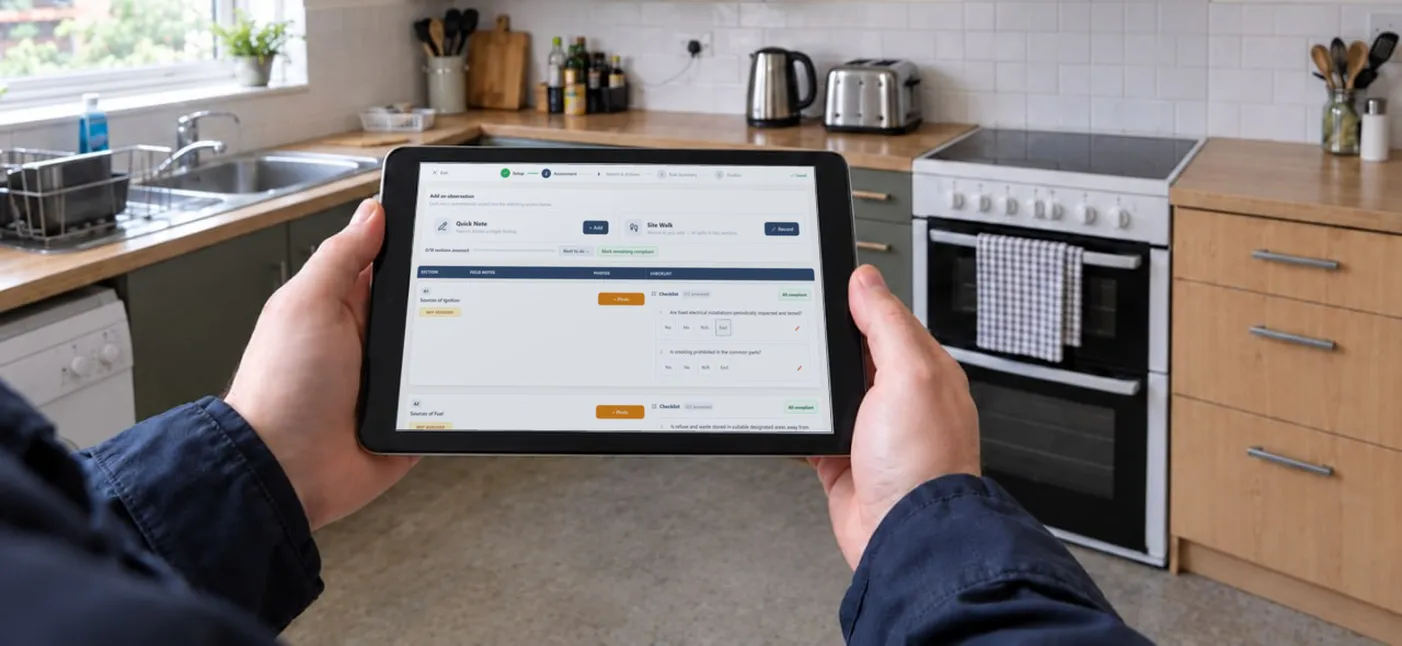
Fire risk assessments are carried out in basements, plant rooms, stair cores and roof spaces, which are exactly the places where a mobile signal gives up. If the app needs a connection to save a note or a photograph, it either loses work or sends the assessor back to paper and a second round of typing at the desk. Everything captured on the day, from notes and voice notes to photographs and the building’s documents, should end up in one place against the right building.
The test is simple. On a trial job, the device stays in flight mode while notes and photographs are taken throughout the building. Once it reconnects, everything should be there and in the right place. The app should also work on whatever the assessor carries, whether that is a phone, a tablet or both. Nobody inspects a fire door with a laptop open on one arm.
Where should AI help, and where should it stop?
AI is the difference between software that holds the material for a report and software that helps write it. Used well, it takes on the slow part of the job:
- Sorting. Each note, voice notes included, goes into the right section of the report, so nothing recorded on site is left behind.
- Drafting. Findings are written from the assessor’s notes and the details recorded about the building, in the firm’s own wording, so they describe this building and no other.
- Flagging. Anything in the notes that looks non-compliant is flagged, so it is far less likely to be missed in the write-up.
Drafting from the assessor’s own notes is much faster than picking and editing preset text, because the assessor reviews and corrects instead of writing.
Where the AI stops matters just as much. It suggests, and the assessor decides. Nothing should reach the report until the assessor has accepted, edited or overruled it, and compliance, risk ratings and action priorities remain the assessor’s call. It should also write only from what was recorded, never filling a gap with something it assumed about the building. On a trial, the draft from a real job can be read against the notes it came from. Every sentence should trace back to something the assessor saw or recorded.
Will the report be one the assessor would sign?
The report is what the client pays for and what an enforcing authority reads, so the output matters more than the screens that produce it. A good fire risk assessment report is clear about the premises, the findings and what needs doing, in that order.
Before committing, it is worth producing a full report from a real job and reading it as the client would. It should pass five checks:
- Formats. The report comes out as a PDF for issue, plus an editable Word version for the clients and situations that need one.
- Branding. It carries the firm’s logo, colours and contact details, not the software supplier’s.
- Photographs. Each one sits beside the finding it supports, with no dragging and resizing by hand.
- The action plan. Every action has a priority and a timescale the responsible person can work to, and progress can be tracked.
- Standard text. Paragraphs such as scope, limitations and legal background are written once by the firm, reused on every report and adjusted where a job needs it.
Does it keep a record that stands up later?
A report may be questioned years after it was issued, by a reviewer, an auditor, an enforcing authority or a court. A demo never shows how the software copes with that. The article on the fire risk assessment audit trail sets out what the record should contain. For software, three checks cover most of it:
- Reasons. Every question marked not applicable or left out carries a written reason, recorded at the time.
- Changes. Anything changed after sign-off is logged with who changed it, when and why. The earlier version is kept rather than overwritten.
- Retention. Records stay available for as long as the firm needs them. BAFE SP205 expects records of all work to be kept for at least seven years, so a lapsed subscription should not take the archive with it.
What should a consultancy look for on top?
Once more than one assessor writes reports under the same name, the software has to help the firm sound like one firm.
- Roles and permissions. Assessors see the work they need, and managers see the whole picture.
- Assigning work. A building or client goes to a named assessor with a due date, so nothing falls between two diaries.
- Review and sign-off. A senior assessor can read a report, send it back with comments and sign it off, with their name and the date recorded. That is also the validation record certification schemes ask to see.
- Consistency. Shared standard text, shared question sets and a single report layout mean the client cannot tell which assessor visited.
- Review dates. The software flags each assessment as its review date approaches. The standard interval is twelve months, and a review comes sooner if anything changes at the premises.
FireRecord is a fire risk assessment app built around these points. Notes, voice notes and photographs are captured on site, with or without signal. Its AI sorts every note into the right section, flags what looks non-compliant and drafts each finding from the assessor’s own notes, and nothing reaches the report without the assessor’s approval. Assessors finish the write-up much faster than with a template or preset text. The report follows PAS 79-1:2020 or BS 9792:2025 and comes out in PDF and Word under the firm’s own branding, with every step from assignment to sign-off kept in the Trail of Records. Find out more at firerecord.co.uk.
Related Articles
Fire Risk Assessment Audit Trail: What the Trail of Records Must Show
What a fire risk assessor's audit trail must capture, why excluded questions need written reasons, and how a report is amended after sign-off.
Fire Risk Assessments in Scotland: What the Law Requires
Scotland has its own fire safety law, and it differs from England's on records, flats and who holds the duty.
Fire Risk Assessment Example: What a Good Report Contains
A section by section look at a completed UK fire risk assessment: premises details, hazards, risk rating, significant findings and the action plan.